Introducing Our New AI Chatbot for WordPress Websites
At Creative Digital Life, we are always looking for new ways to help our customers get more value from their websites.
Your website should do more than simply display information. It should help visitors find what they need quickly, answer common questions, guide people to the right place and encourage more enquiries.
That is why we are now offering a new AI Chatbot for WordPress websites.
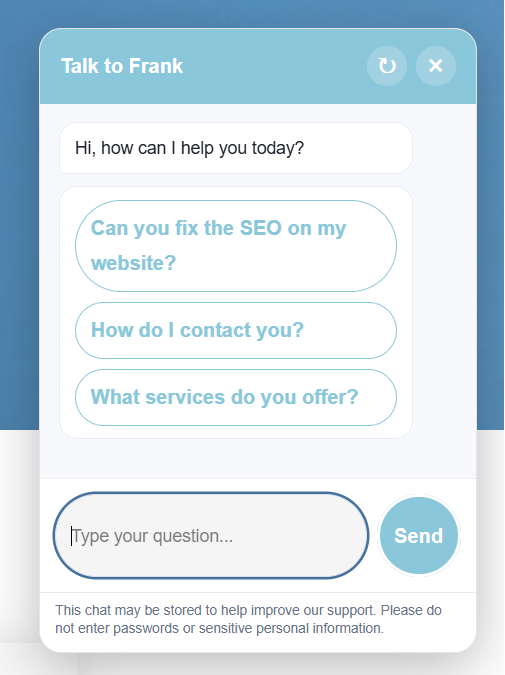
This smart website assistant sits on your website and allows visitors to ask questions in a simple chat window. It can help people find information, access useful links, submit enquiries and get support without needing to search through every page of your site.
What does the AI chatbot do?
The chatbot is designed to make your website easier to use.
Visitors can ask questions such as:
- What services do you offer?
- How do I contact you?
- Where can I download your app?
- What are your opening times?
- How do I reset my password?
- Where can I find your policies?
- Can someone get back to me?
The chatbot can then reply using information from your website, approved answers, documents, quick links and settings that are managed through WordPress.
Learns from your website content
One of the most useful features is that the chatbot can use your existing website content to help answer visitor questions.
This means if the answer is already on your website, the chatbot can help visitors find it more easily.
For example, instead of someone searching through several pages to find a contact number, app link, policy, service description or opening time, they can simply ask the chatbot.
Reduce repetitive enquiries
Many businesses and organisations receive the same questions again and again.
The AI chatbot can help reduce repetitive phone calls, emails and messages by answering common questions automatically.
This is especially useful for:
- Schools
- Nurseries
- Local businesses
- Restaurants
- Beauty salons
- Tradespeople
- Service-based businesses
- Charities
- Community organisations
By answering simple questions instantly, the chatbot helps free up your time while giving visitors a better experience.
Capture more enquiries
If the chatbot cannot answer a question, it can collect the visitor’s details and send the enquiry directly to your chosen email address.
The lead capture form can ask for:
- Name
- Email address
- Phone number
- Message
This means visitors are not left stuck if they cannot find what they need. Instead, they can leave their details and your team can follow up.
Add useful buttons and links
The chatbot can display clickable buttons directly inside the chat window.
These can be used for things like:
- App download links
- Booking links
- Payment links
- Contact pages
- Password reset links
- Support links
- Policy documents
- Important website pages
This makes it easier for visitors to take action without having to search around the website.
Customised to your brand
The chatbot can be customised to suit your website and brand.
Options include:
- Chatbot name
- Welcome message
- Brand colour
- Chat button style
- Uploaded icon or image
- Suggested questions
- Tone of voice
- UK English spelling
- Professional or friendly personality
You can keep it simple and professional, or give it more character depending on your brand.
Built-in safety and control
You stay in control of what the chatbot can and cannot say.
The plugin includes options for:
- Website-only answer mode
- Competitor restrictions
- Seasonal rules
- Blocked phrases
- Do-not-answer rules
- Chat logs
- Unanswered question review
- Rate limiting
- Lead capture settings
This means the chatbot can be helpful while still staying within the boundaries you set.
Great for school websites
For schools, the chatbot can help parents, carers and visitors quickly find important information.
It can help with:
- App download links
- Password reset guidance
- Term dates
- Contact information
- School policies
- Attendance information
- Office opening times
- Frequently asked questions
This can help reduce repeated office enquiries and make your website easier for families to use.
Great for business websites
For businesses, the chatbot can support potential customers while they are browsing your website.
It can help answer questions about:
- Services
- Prices or packages
- Opening hours
- Appointments
- Contact details
- Locations
- Booking links
- Documents or downloads
If the visitor needs more help, the chatbot can collect their details so you can follow up.
Why add an AI chatbot to your website?
Adding an AI chatbot can help your website:
- Answer common questions instantly
- Improve visitor experience
- Reduce repetitive admin
- Capture more enquiries
- Guide visitors to important pages
- Make useful links easier to find
- Support customers outside normal working hours
- Keep your website feeling modern and helpful
It gives your visitors a quicker way to get help, while giving you more control over how enquiries are handled.
Interested in adding one to your website?
If you already have a WordPress website with Creative Digital Life, we can add the AI chatbot to your existing website and customise it to suit your business or organisation.
We can help with:
- Installation
- Branding
- Setup
- Website content indexing
- Suggested questions
- Quick links
- Lead capture
- Testing
- Ongoing improvements
If you would like to find out more about adding an AI chatbot to your website, please get in touch with Creative Digital Life.